
template
Facebook Cover Photo Template
Use this Facebook cover photo template with an 851 × 315 px canvas, 400 × 150 px minimum, fast-loading export notes and mobile-safe design tips.
Last checked: 2026-05-03
How we calculate this
Methodology and source handling
We start with the platform placement, confirm the recommended pixel canvas and aspect ratio from the listed sources, then document safe-area and export guidance for the template.
Quick answer
Copy-ready answer
Use 851 × 315 px for a Facebook Page cover photo. Facebook lists a minimum of 400 × 150 px. For best loading, export an sRGB JPG at the recommended dimensions and keep important details away from the profile-picture overlap and mobile crop risk.
Safe area
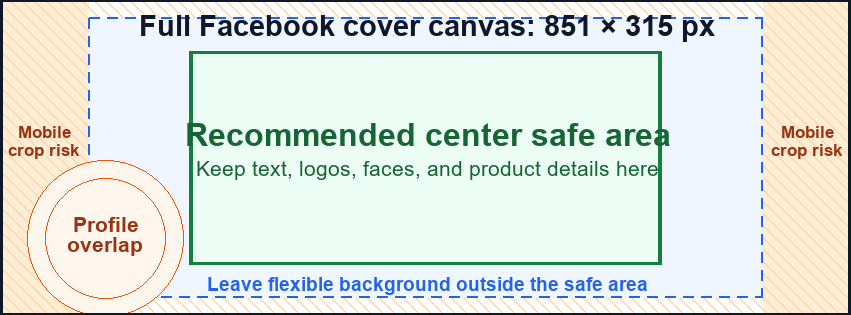
Design inside the crop-safe area
Use this guide to keep text, logos, faces, products, and calls to action away from crop-risk edges.
Dimensions and specs
| Recommended cover photo | 851 × 315 px | |
|---|---|---|
| Minimum cover photo | 400 × 150 px | |
| Aspect ratio | about 2.70:1 | |
| Optional 2x design canvas | 1702 × 630 px | |
| Best fast-loading format | sRGB JPG | |
| Text placement | Center-weighted, away from profile-picture overlap |
Formula
How to calculate this size
Export at the recommended pixel canvas before upload or handoff.
Reduce width and height by their greatest common divisor.
Use fit for no crop, fill or center crop for exact coverage, or pad when borders are acceptable.
Export checklist
Before you upload
Create the artboard at the template dimensions before placing content.
Keep critical details inside the safe zone and treat the outer edge as crop or bleed risk.
Resize a finished image locally when the destination needs a PNG, JPG, or WebP export.
Common mistakes
Avoid these template setup mistakes
Keep the most important content inside the guide area so responsive crops, bleed trimming, or platform overlays do not hide it.
Scaling the template into a different shape can stretch artwork or crop text; compare sizes before adapting.
Keep the editable SVG or source layout, export PNG/JPG for upload, and use PDF when you need a handoff or print guide.
Templates
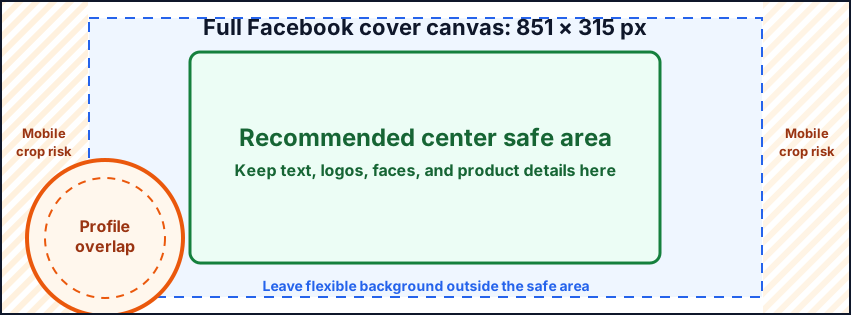
Download starter files
Use the SVG, PNG, or PDF starter as a visible guide for the full canvas, safe area, bleed, and crop-risk edges.
Calculator
Check aspect ratio and screen pixels
Use the prefilled target, swap orientation if needed, and copy the reduced ratio before preparing screenshots or previews.
Compare
Compare Facebook Cover Photo Template
Open a curated comparison or send both sizes into the compare tool with a fragment URL.
Platform notes
Requirements and crop behavior
Workflow
Setup steps
Canva
Create a custom design at 851 × 315 px. For sharper source artwork, design at 1702 × 630 px and export down if needed. Preview the cover on both desktop and mobile after upload.
Photoshop
Create an 851 × 315 px canvas. Use sRGB. Export as JPG with enough compression to load quickly while keeping text sharp.
Figma
Create a frame at 851 × 315 px and add a center-safe group. If the same art will be reused on LinkedIn or YouTube, create separate frames rather than scaling the Facebook cover directly.
Template
Template zones
| Zone | Use |
|---|---|
| Full cover | Background image, brand color, campaign artwork |
| Central safe area | Main message, logo, people, product or event title |
| Profile overlap caution | Avoid key text near the lower-left area where profile imagery can affect perception |
| Edge caution | Avoid small text near the far edges because mobile and desktop layouts can differ |
Guidance
Design guidance
Facebook covers are wide and shallow. Use one message, not a full poster layout. If the cover promotes a sale, event or launch, keep the text large. If it is a brand banner, use the logo and visual style rather than many details.
Template
Safe-area, bleed, and crop notes
Use the downloadable guide as the full canvas. Keep critical content inside the safe area, extend backgrounds to bleed or crop-risk edges when needed, and export only after checking the destination page.
| Download | Best use |
|---|---|
| SVG | Editable vector starter file for layout tools. |
| PNG | Quick raster preview or upload starting point. |
| Shareable layout guide for print, handoff, or review. |
Related
Related pages and tools
Same branch
Nearby pages
FAQ
Common questions
What size is a Facebook cover photo?
Use 851 × 315 px for a Facebook Page cover photo.
What is the minimum Facebook cover photo size?
Facebook lists 400 × 150 px as the minimum.
Should I use JPG or PNG?
Use JPG for photographic covers and PNG for simple graphics or logos. Facebook’s fast-loading guidance favors an sRGB JPG at the recommended size.
Can I use the same image for LinkedIn?
Not directly. LinkedIn profile backgrounds use 1584 × 396 px, so create a separate layout.
References
Sources and references
Original draft source confidence: official_platform_spec.
Facebook Help lists the Page cover photo dimensions, minimum size and fast-loading guidance. Recheck this source before major site refreshes because Meta interface requirements can change.
-
Facebook Help: Page profile picture and cover photo dimensions
Reviewed for this PixelMeasures article cluster.
Last checked: 2026-05-03