
Facebook image sizes
Facebook Cover Photo Size: 851 × 315 Pixels
The recommended Facebook cover photo size is 851 × 315 pixels. Use this canvas for a fast-loading Page cover, keep key content centered, and check mobile after upload.
Last checked: 2026-05-01
How we calculate this
Methodology and source handling
We check official platform documentation first and label practical production targets when no exact public spec exists.
Quick answer
Copy-ready answer
The recommended Facebook cover photo size is 851 × 315 pixels. The minimum upload is 400 × 150 pixels, but 851 × 315 px is the official fast-loading Page cover target.
Resize tool
Resize image to Facebook cover size
Upload an image, use the preset target, choose a crop mode, and export JPG, PNG, or WebP without leaving your browser.
Your image stays in your browser.
Safe area
Design inside the crop-safe area
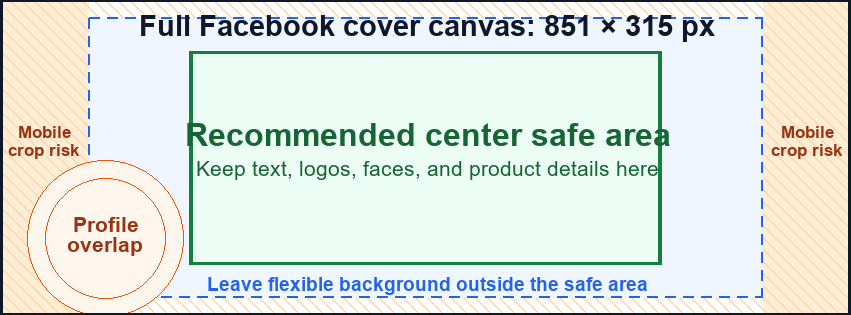
The full 851 × 315 canvas is the upload target. Keep important text, logos, faces, and products inside the center safe area because the profile image can overlap the left side and mobile can crop the outer edges.
Dimensions and specs
| Recommended pixels | 851 × 315 px | |
|---|---|---|
| Minimum upload | 400 × 150 px | |
| Aspect ratio | 851:315 | |
| Fast-loading file | sRGB JPG under 100 KB |
Formula
How to calculate this size
Export at the recommended pixel canvas before upload or handoff.
Reduce width and height by their greatest common divisor.
Use fit for no crop, fill or center crop for exact coverage, or pad when borders are acceptable.
Desktop and mobile
How this image displays
Use the upload size as the source canvas, then keep important content inside the safest visible area.
| Item | Desktop | Mobile | Text/logo placement |
|---|---|---|---|
| Upload size | Upload 851 × 315 px for the official fast-loading Page cover size. | Use the same upload; Facebook may resize or crop it for smaller screens. | Keep important content in the center safe area, not on the far left or outer edges. |
| Desktop display behavior | Wide Page header with the profile picture able to overlap the left side. | Mobile layouts can show a tighter crop than desktop. | Leave flexible background behind the profile overlap and edge-crop zones. |
| Mobile crop behavior | Desktop usually shows more of the wide canvas. | Outer left/right areas are the highest crop-risk zones. | Avoid text or logo lockups in the striped crop-risk areas. |
| Text and logo placement | Center-weighted text is easiest to keep visible. | Short, large text survives mobile better than dense copy. | Place logos, faces, and calls to action inside the green center safe area. |
Export checklist
Before you upload
Export the final Facebook cover canvas at exactly 851 × 315 pixels.
Use sRGB so colors are predictable on web and mobile displays.
Facebook lists this as the fastest-loading recommendation for cover photos.
Use PNG when crisp typography, logos, or flat graphics matter more than file size.
Preview both surfaces before publishing because crop behavior can change.
Common mistakes
Avoid these image problems
The left side is risky because the profile picture can overlap it.
Keep marks and faces out of the profile overlap zone.
Small uploads can look soft after Facebook resizing.
A tall or square image will be cropped into the wide cover shape.
Dense cover text becomes hard to read when the layout tightens.
Templates
Download a Facebook template
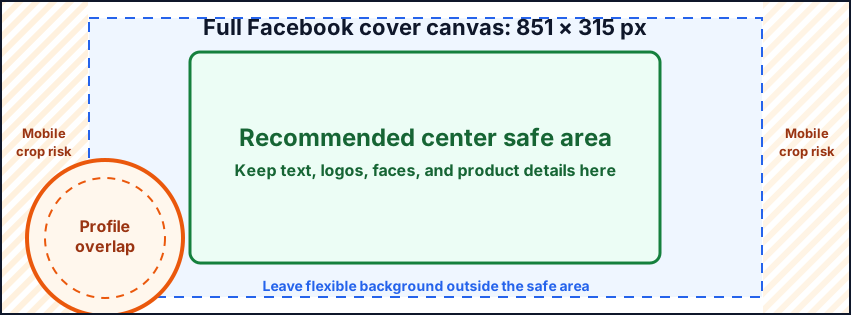
Use the template as a visible guide for the full canvas, crop risk, and safest placement area.
Platform notes
Requirements and crop behavior
Keep logos, faces, and text inside the center safe area. Avoid the left overlap zone and the outer mobile crop-risk edges.
Facebook can resize or crop cover photos by screen size. Check desktop and mobile after upload.
Resize with this presetWorkflow
Use Facebook Cover Photo Size: 851 × 315 Pixels in a finished file
Use the exact platform preset for the cover, thumbnail, post, story, or profile image.
Keep text, faces, and logos inside the safest visible area.
Use the resizer preset, choose a crop mode, then export in a supported format.
Related platform sizes and tools
Related platform sizes and tools
FAQ
Common questions
What is the recommended Facebook cover photo size?
The recommended Facebook cover photo size is 851 × 315 pixels. The minimum upload is 400 × 150 pixels.
Where should I put text on a Facebook cover?
Put text and logos in the center safe area. Avoid the far left, where the profile picture can overlap, and avoid outer edges that can crop on mobile.
Should a Facebook cover photo be JPG or PNG?
Use an sRGB JPG under 100 KB for photos when possible. Use PNG for logo, text, or flat artwork that needs sharper edges.
Source
Official source
Verified against the official Facebook Help page for Page cover and profile picture dimensions.
-
Facebook Help: Page profile picture and cover photo dimensions
Official Facebook source for cover size, minimum upload, file guidance, and profile overlap behavior.
Last checked: 2026-05-01